
Two techniques together
Compress eligible files and let verified identical files share storage through APFS clones, not hard links. Each copy stays independently editable.
Understand clone sharingDiskPress for Files for iPhone & iPad
Keep a lot of documents and project files on your device? Make supported local files in the Files app use less space, while keeping them right where they belong.
DiskPress for Files brings the same lossless compression and APFS file deduplication core as DiskPress for Mac to iPhone and iPad. Your files keep their contents and open normally. No archives to unpack.
For iPhone and iPad. Awaiting App Store approval, not yet available to download.
Local files only. Not a Photos library cleaner or a way to optimize cloud storage. See what is supported.
Compare with DiskPress for Mac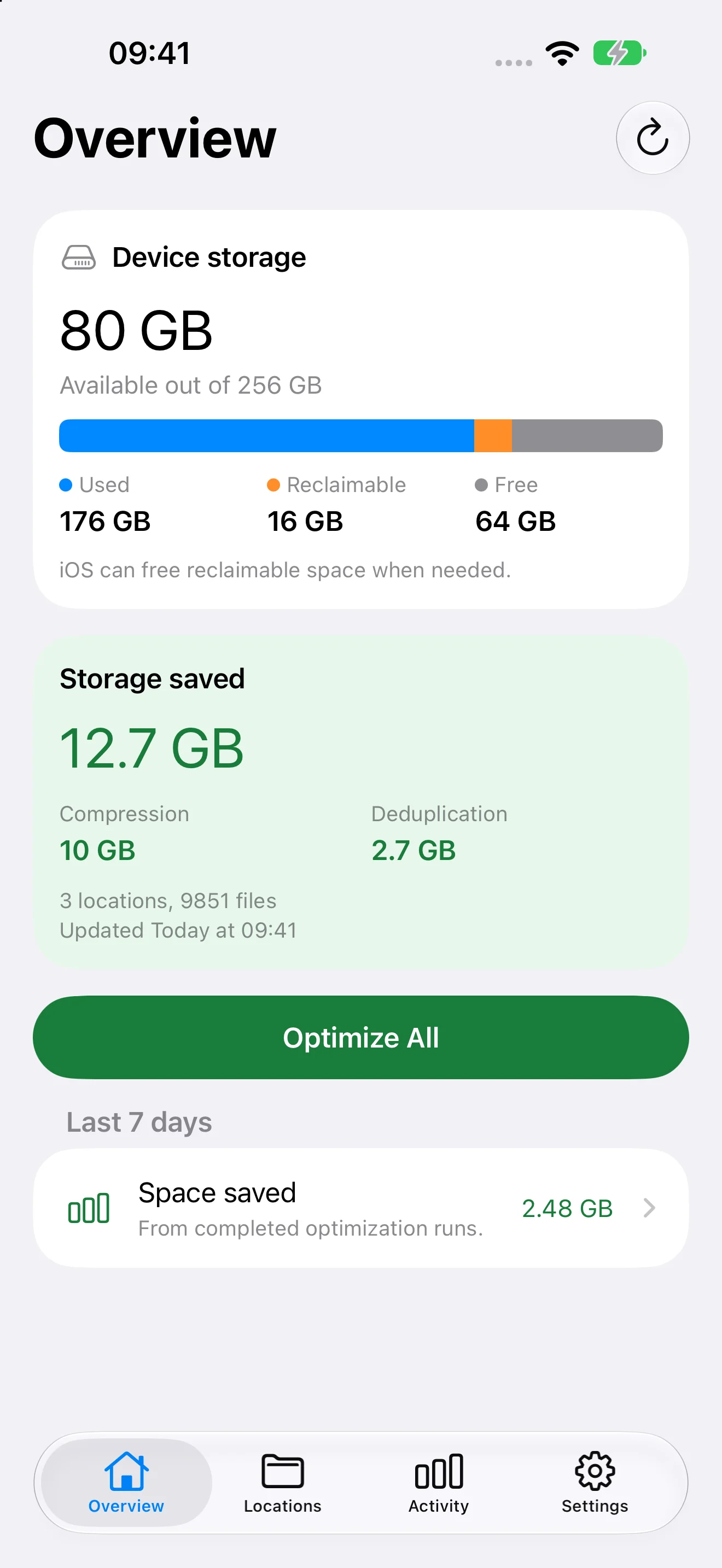
A deliberate, local workflow
Select a supported local folder or individual files. Review the selection, choose your optimization mode, and start when you are ready.
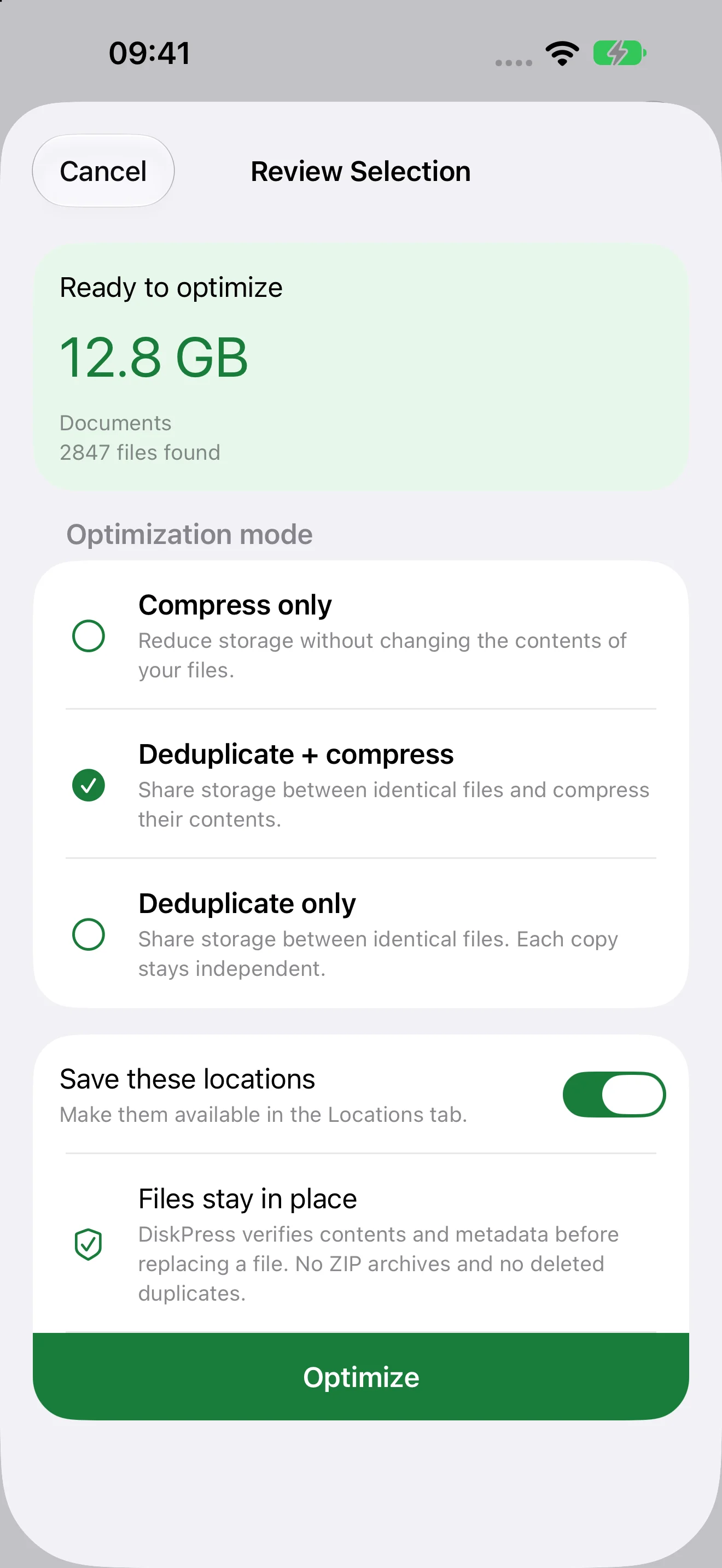
Compress eligible files and let verified identical files share storage through APFS clones, not hard links. Each copy stays independently editable.
Understand clone sharingUse compression, deduplication, or both. Save locations for next time, optimize one separately, or include selected locations in Optimize All.
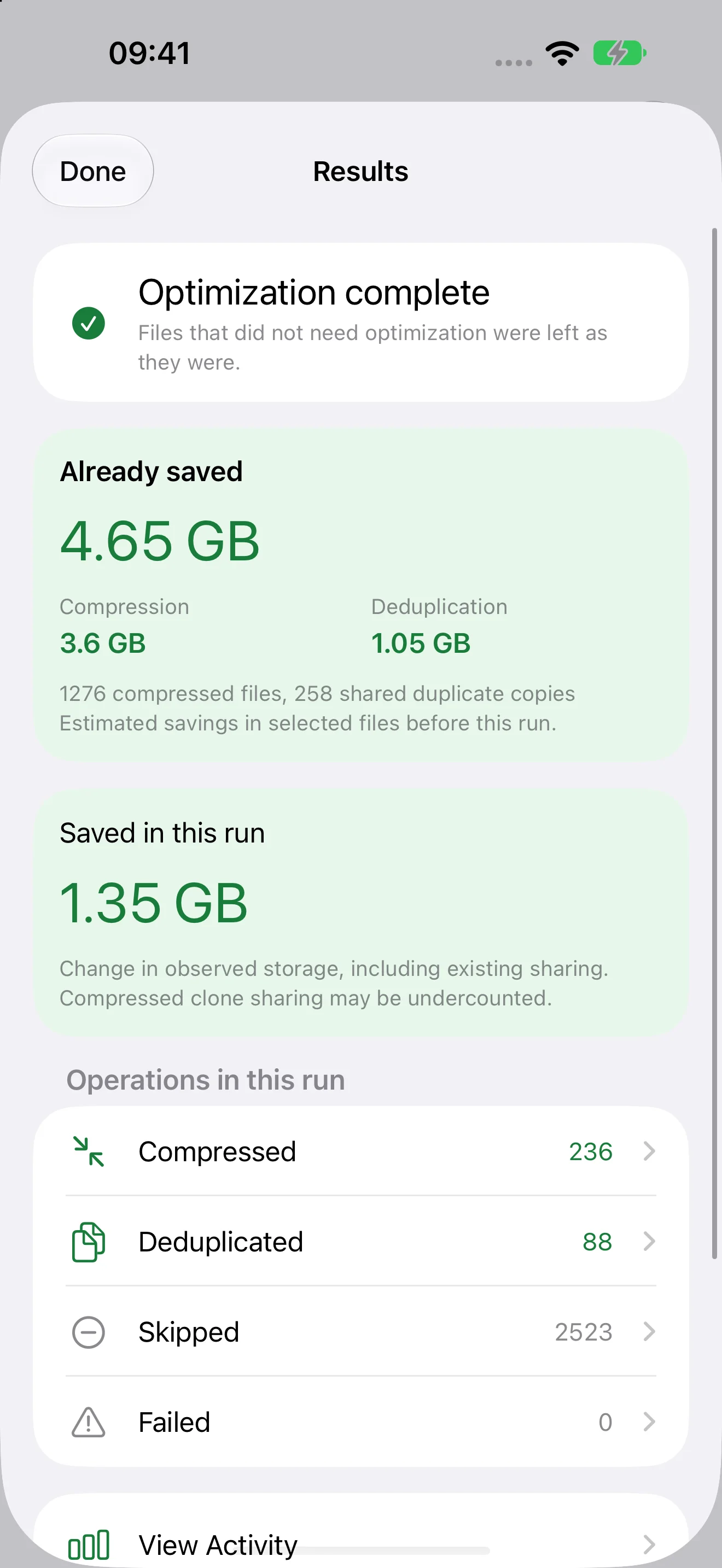
See existing savings separately from savings added by the current run. Review completed, skipped, and unsuccessful work in Activity.
Check the selected files, choose a mode, and decide whether to save the locations for later.
Separate new savings from storage already saved, with counts for compressed, deduplicated, and skipped files.
App screenshots use example data. Savings depend on your files and settings.
Made for files, not everything on your device
The Files app shows many kinds of storage. DiskPress for Files works only with supported, writable local files on APFS that you grant it permission to access.
Choose a supported folder inside "On My iPhone" or "On My iPad", rather than the top-level location itself. Mostly stable documents and completed project files are useful candidates.
Already-compressed files may save little or nothing. Eligibility also depends on the folder's permissions and the operations its provider allows.
The app cannot compress or deduplicate your Photos library, iCloud Drive, other cloud or network providers, installed apps, or protected system and app paths.
Seeing an item in Files does not mean it is a supported local file. Downloading a cloud item does not make its cloud-provider location a supported target.
Keep an independent backup. Optimization rewrites files at their existing paths and adds storage writes. Prefer settled files over folders with constant changes. Verification and recovery checks help protect the work, but are not a substitute for a backup.
Same core, different platforms
Both apps reduce physical storage without changing file contents. iOS limits access and automation, so DiskPress for Files is built around work you start yourself.
| Capability | DiskPress for Mac | DiskPress for Files |
|---|---|---|
| Compression and APFS deduplication | Yes, using the shared core | Yes, using the same core |
| One-time work and saved locations | Yes | Yes |
| Automatic folder monitoring | Optional recurring optimization | No automatic monitoring |
| Command line and menu bar | CLI and menu bar controls | No CLI or menu bar |
| Supported storage | Eligible local files and compatible external volumes | Eligible local files selected through Files, not Photos, cloud storage, or protected paths |
| Where to get it | Mac App Store or Setapp, with the same Mac features | Separate iPhone and iPad App Store app |
DiskPress for Files does not watch folders or schedule future runs. On iOS or iPadOS 26 or later, a run you already started may continue in the background if the system allows it. Otherwise, leaving the app pauses work safely so you can resume when you return.
That is continuation of your current task, not automatic monitoring for new files.
Once optimization finishes, native compression and clone sharing keep working without DiskPress for Files running. Edits, copies, or replacements can change those savings.
Keep the files you want. Open them normally. No separate reader required.
Private by design
DiskPress for Files makes no Internet connections. No separate app account, no analytics, no telemetry, and no file uploads. Settings, permissions, Activity, and recovery records stay on your device.
Reports leave the app only when you choose to share them. Opening a website link visits that website in your browser.
Read the iPhone and iPad privacy detailsBuilt for iPhone and iPad
A dedicated touch interface, with tabs on iPhone and a sidebar on iPad. Requires iOS or iPadOS 14 or later and supported local APFS storage. Some background continuation features require iOS or iPadOS 26 or later.
Made by Ighor July, the developer of DiskPress for Mac. Mac purchases, Setapp access, and the Storage Saver Duo Mac bundle are separate from this app.
Read the iPhone and iPad termsDiskPress for Files is the iPhone and iPad app built on the same compression and deduplication core as DiskPress for Mac. It helps supported local files in the Files app use less physical storage without changing their contents or making you unpack archives.
Available soon. DiskPress for Files is awaiting App Store approval and is not yet available to download.
It requires iOS or iPadOS 14 or later and supported, writable local APFS storage. It is a separate app from DiskPress for Mac. A Mac purchase, Setapp access, or the Storage Saver Duo Mac bundle does not include it unless an offer explicitly states otherwise. See the iPhone and iPad terms.
Only supported, writable local files on APFS that you authorize through the Files picker. Choose a supported folder inside "On My iPhone" or "On My iPad", not that top-level location itself. You can optimize a saved location, use Optimize All for included locations, or select files and folders for one-time work.
DiskPress for Files cannot optimize your Photos library, iCloud Drive, other cloud or network providers, installed apps, or protected system and app paths. A file appearing in Files, or being downloaded by a cloud provider, does not make its provider location a supported target. Some local folders also restrict the operations optimization needs.
When selecting individual files, the app may also need permission to access their containing folder for safe replacement and recovery. Common already-compressed formats are excluded by default and may offer little saving anyway.
No. DiskPress for Files has no automatic folder monitoring, scheduled optimization, menu bar controls, or CLI. iOS access and execution limits mean you start each optimization yourself. Saving a location does not make the app watch it.
On iOS or iPadOS 26 or later, a run you already started may continue in the background when the system grants permission. On older systems, or when that request is not granted, leaving the app pauses work safely so you can resume when you return. Locking the device can also pause access to protected data. This does not add automatic monitoring.
Choose DiskPress for Mac if you need recurring folder optimization or command-line workflows on your Mac.
Successfully optimized files retain their contents, names, and locations. Native filesystem support reads them without a separate DiskPress reader, even after the app closes. APFS clones remain separate files, so editing one does not change the other.
Savings depend on file contents, existing compression, duplicates, settings, and filesystem overhead. Already-compressed media can save little or nothing. Deduplication savings are estimates, not a promise of the same increase in available space. Edits, copies, or replacements can change the savings.
Choose mostly stable files, keep an independent backup, and allow cancellation or recovery to finish. Optimization rewrites files and adds storage writes, so avoid repeatedly processing busy folders.
No. DiskPress for Files makes no Internet connections and has no analytics, telemetry, file uploads, or separate app account. Settings, permission bookmarks, file metadata, Activity, and recovery records stay on your device.
You decide whether to export and share an Activity or diagnostic report. Reports can contain paths and filenames, so review them first. Opening a website link uses your browser and that website's privacy practices. Apple separately handles App Store services and any system analytics you choose to share.
Read the iPhone and iPad privacy details. The Setapp framework and Mac integrity-diagnostic behavior do not apply to DiskPress for Files.
DiskPress for Files for iPhone and iPad.
For iPhone and iPad. Awaiting App Store approval, not yet available to download.